
The world of artificial intelligence image generation is moving at a breakneck pace. Creators, marketers, and hobbyists are constantly looking for the next big leap in technology to bring their digital visions to life. Currently, the most talked-about advancement in the global digital art community is the Seedream 5 model. Because of its incredible ability to understand complex natural language, maintain strict character consistency, and generate hyper-realistic textures, everyone in the creative industry is searching for comprehensive tutorials on How to Use Seedream 5.0.
However, navigating the complex landscape of modern AI tools can be an incredibly overwhelming experience for beginners and professionals alike. You might be wondering How to Use Seedream 5.0 without having to deal with complicated technical setups, confusing parameter sliders, or expensive monthly subscription fees. Many tools on the market require you to be a software engineer just to generate a simple photograph.
If you are looking for a straightforward, accessible, and completely free method to access this powerful technology, you are in the exact right place. In this massive and comprehensive guide, we will break down absolutely everything you need to know about How to Use Seedream 5.0. We will cover the core benefits of the model, why traditional platforms fail, the exact click-by-click process to generate your first image, and advanced prompt engineering techniques. By the time you finish reading this article, you will be generating breathtaking, professional-grade artwork in a matter of seconds.
What Makes the Seedream Model So Different?
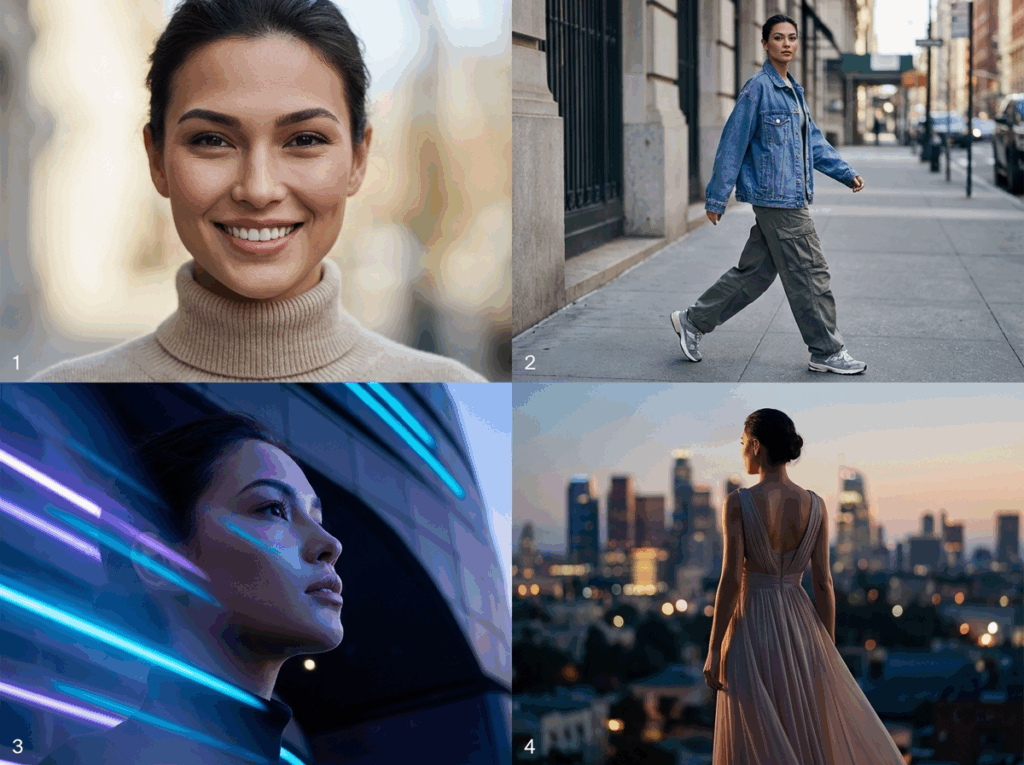
Before we dive into the actual interface, it is important to understand why there is such a massive surge of interest in How to Use Seedream 5.0. The answer lies in its foundational architecture and its approach to interpreting human instructions. Previous generation models often struggled with basic prompt adherence. You could type a highly detailed paragraph describing a scene, and the AI would simply ignore half of your instructions or blend concepts together in a messy way.
The Seedream 5 engine completely changes this dynamic. It features a revolutionary approach to deep semantic understanding. When you learn How to Use Seedream 5.0 effectively, you quickly realize that it actually comprehends the spatial relationship between subjects, objects, lighting sources, and background environments. If you ask for a glass cup sitting on the edge of a wooden table reflecting sunlight, it understands the physics of that request.
Furthermore, the character consistency is unmatched in the current market. Whether you are generating a continuous comic book narrative, a storyboard for a film, or a marketing campaign featuring the same virtual fashion model, the facial features, expressions, and structural proportions remain incredibly stable across multiple generations. This precise level of control is exactly why mastering How to Use Seedream 5.0 has become a top priority for digital artists, graphic designers, and social media managers worldwide.
The Traditional Problem: Why Access is Usually Hard

Despite its undeniable power and popularity, many everyday users face significant hurdles when trying to access this specific model. Typically, accessing cutting-edge AI models involves jumping through dozens of frustrating hoops. You might have to register for a restrictive account on a foreign platform, verify your personal phone number, or navigate a user interface that looks more like a database dashboard than a creative tool.
Many popular image generation platforms require you to connect third-party chat applications like Discord or force you to set up local installations using expensive, high-end graphics cards. This massive friction discourages everyday users who just want to turn their imagination into beautiful images quickly. They spend hours reading confusing technical manuals on How to Use Seedream 5.0 only to hit a geographical region lock, a strict paywall, or a continuous login error.
The market desperately needed a solution that democratized access to this state-of-the-art technology. Creators need a platform that focuses entirely on the creative process rather than account management and billing cycles.
The Best Solution: How to Use Seedream 5.0 Without Restrictions
Fortunately, there is a vastly superior and far more accessible way to harness this power. If you want to know the absolute easiest and most efficient method regarding How to Use Seedream 5.0, the answer is ImageEditor.online. We have integrated the official, full-power Seedream 5 engine directly into a streamlined, web-based platform designed specifically for user-friendliness and high-quality output.
Here are the core advantages of choosing our platform for your creative needs. First and foremost, there is absolutely no login required. You do not need to hand over your personal email address, verify your identity, or remember yet another password. You simply open the webpage and start creating immediately. Second, we offer a generous amount of free daily credits. While other competitor sites charge hefty monthly fees just to test the basic capabilities of the model, we strongly believe that you should be able to experiment and learn freely.
Third, the user interface is incredibly simple and intuitive. There are no confusing node-based systems, complicated numerical weights, or hidden developer settings to break your workflow. Finally, we provide powerful built-in style workflows. You do not need to memorize complex keyword tags to get a specific look. We have pre-configured artistic styles for Photos, Illustrations, 3D renders, and graphic Posters. You can access all of these premium features right now at our Free AI Image Generator.
Step-by-Step Guide: How to Use Seedream 5.0 on Our Platform
Now that you understand the immense value of the platform, let us dive into the practical application. This specific section provides a complete, foolproof tutorial on How to Use Seedream 5.0 using our customized interface. The entire process is designed to take less than ten seconds from the moment you open the page to the moment your image is ready.
Step 1: Open the Generator Interface
Navigate to our website using any modern desktop or mobile web browser. You will immediately be greeted by a clean, professional workspace split into two main sections. On the left side, you will find your control panel where you make all your creative decisions. On the right side, you will see the large showcase canvas where your generated masterpieces will appear.
Step 2: Select the Correct Engine
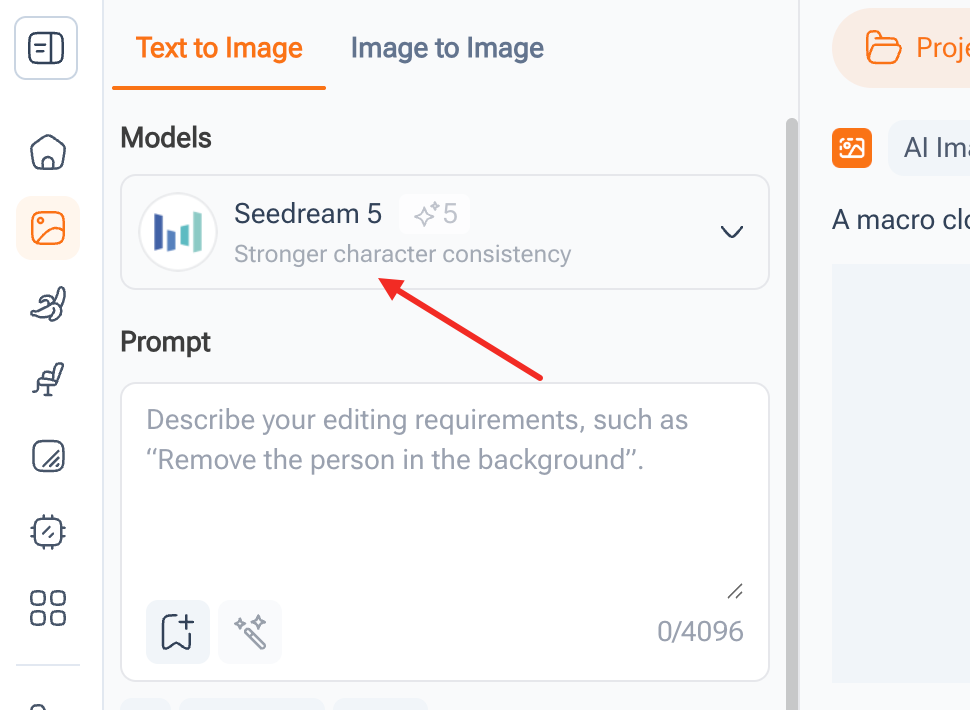
On the left-hand control panel, look at the very top under the Models section. Click on the dropdown menu and ensure that Seedream 5 is selected. You will notice a small descriptive text highlighting its stronger character consistency. This visual confirmation ensures you are utilizing the latest and most powerful engine available. Selecting the right model is the most crucial foundational step when learning How to Use Seedream 5.0.
Step 3: Choose Your Visual Style Preset
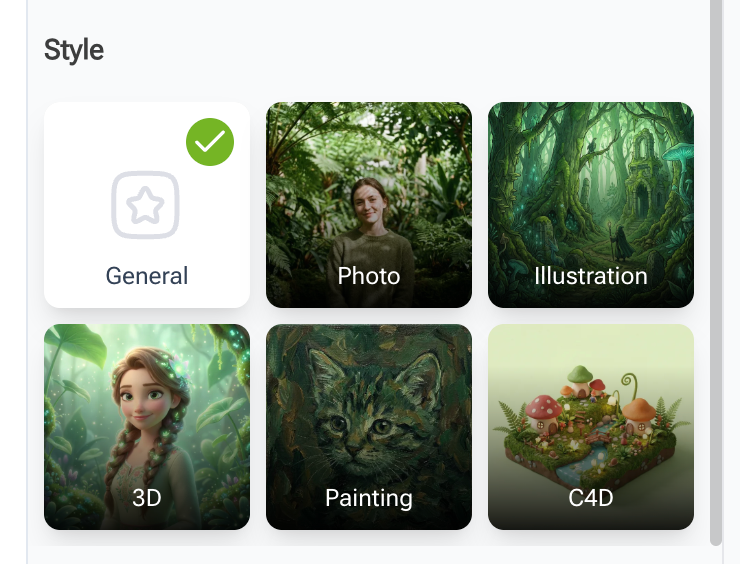
Scroll down slightly to the Style section. This is where our platform truly outshines the competition. Instead of forcing you to type out complex lighting and camera parameters, we allow you to simply click on a visual thumbnail. If you want a highly realistic, cinematic portrait, click the Photo preset. If you want a hand-drawn digital painting or anime aesthetic, click the Illustration preset. We also feature dedicated buttons for cute 3D environments and flat-design Posters.
Step 4: Craft Your Text Prompt
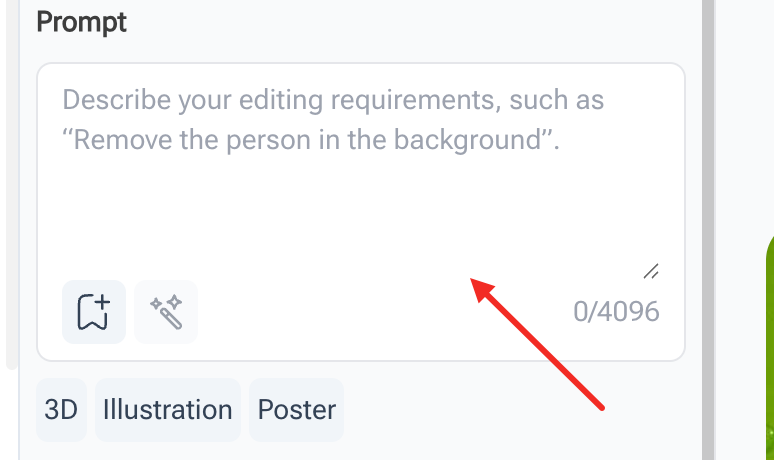
Below the model selection, you will see a large text box labeled Prompt. Here, you will describe exactly what you want to see. Because the natural language processing of this model is so incredibly advanced, you can write in plain, conversational English. Describe the main subject, the background environment, the colors, and the overall mood of the scene. You have up to 4096 characters to be as detailed as you wish.
Step 5: Generate and Save Your Artwork
Once you are completely satisfied with your text description and style selection, move to the bottom of the left panel and click the large orange Generate button. The cloud-based system will process your complex request rapidly. Within mere moments, your stunning, high-resolution image will materialize on the main canvas on the right. You can then download it directly to your device for immediate use. This frictionless, streamlined workflow is the ultimate secret to How to Use Seedream 5.0 efficiently and effectively.
Advanced Prompt Engineering Guidelines

Even with an incredibly easy-to-use interface, the final quality of your output heavily depends on your initial input. Understanding proper prompt structure is absolutely essential for anyone deeply researching How to Use Seedream 5.0. The underlying engine responds best to highly structured, logical descriptions rather than random, chaotic word salads.
You should always start your prompt with the primary subject. Be exceptionally specific about their age, physical appearance, clothing materials, and facial expression. Next, describe the action taking place. What is the subject actively doing? Are they running through a crowded street, sitting in a quiet cafe, or looking directly at the camera lens?
After establishing the main subject, move your focus to the surrounding environment. Is the scene taking place in a futuristic cyberpunk city, a dense magical forest, or a sterile white photography studio? Provide rich details about the background elements to give the AI context. Finally, define the lighting and camera medium. Mention specific photography terms like soft cinematic lighting, dramatic golden hour shadows, bright neon glow, macro lens photography, or wide-angle drone shot. When you combine all these elements logically, you truly master How to Use Seedream 5.0 to its absolute fullest potential.
Copy and Paste Prompt Examples
To help you overcome the blank canvas syndrome and get started immediately, we have curated a specialized list of highly effective prompts. You can copy these text blocks directly into the Seedream 5.0 tool to see the stunning results for yourself. Testing different scenarios and tweaking these templates is the absolute best way to practice How to Use Seedream 5.0.
Hyper-Realistic Photography Prompt
A cinematic close up portrait shot of a beautiful young woman submerged in crystal clear ocean water up to her nose. She has piercing brown eyes looking directly at the viewer and wet dark hair slicked back. The background is a beautifully blurred vibrant tropical sunset featuring bright teal and soft pink hues. High resolution photography, hyper detailed skin texture, dramatic lighting, National Geographic style. Ensure you click the Photo style preset before generating.
Dreamy Digital Illustration Prompt
A highly detailed, cozy, magical coffee shop hidden inside a giant hollowed out ancient tree trunk in a mystical forest. Warm glowing yellow fairy lights are hanging from the wooden branches. A cute animal barista is making coffee behind a wooden counter. Soft pastel colors, gentle shadows, Studio Ghibli aesthetic, highly detailed anime background art, masterpiece. Ensure you click the Illustration style preset before generating.
Cute Miniature 3D Asset Prompt
A cute miniature 3D isometric diorama of a modern matcha chocolate ice cream parlor. The scene features a mint green and pastel brown color palette. Include tiny detailed waffle cones, glossy ceramic textures, soft studio lighting casting realistic shadows, ultra detailed clay rendering, trending on ArtStation 3D. Ensure you click the 3D style preset before generating.
Modern Graphic Design Poster Prompt
A bold, modern typography poster design for an electronic music festival. The background features abstract geometric shapes in neon purple and bright yellow. The composition is dynamic and futuristic with high contrast. Clean layout, vector art style, commercial advertising quality. Ensure you click the Poster style preset before generating.
Industry Use Cases for Professionals
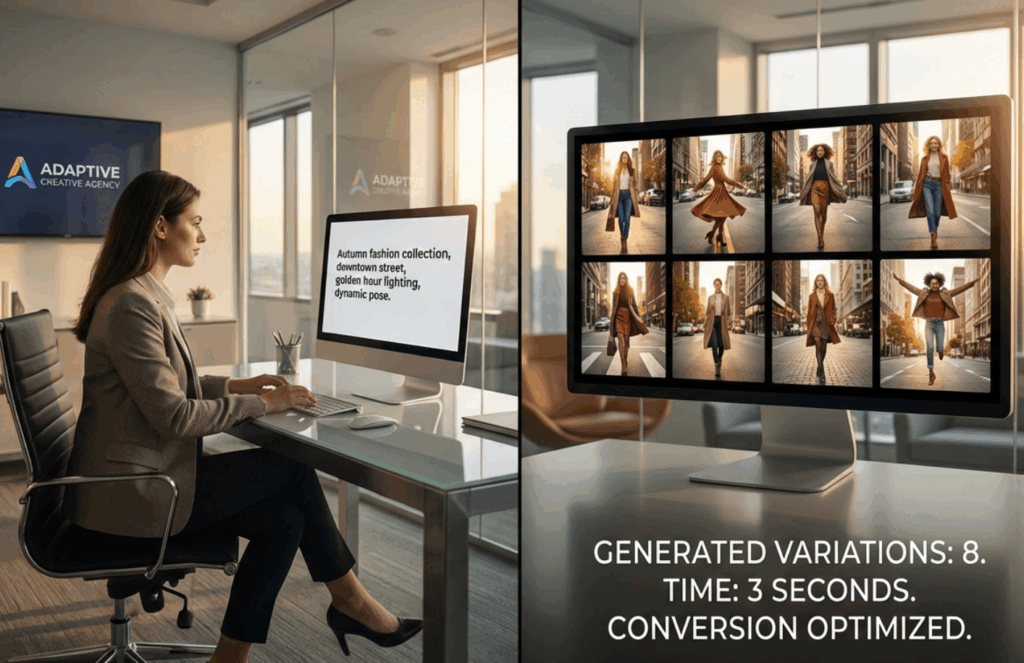
The sheer versatility of this advanced model is truly astounding. Professionals across dozens of various competitive fields are discovering How to Use Seedream 5.0 to dramatically accelerate their daily workflows and reduce production costs.
For digital marketers and advertising agencies, the ability to generate highly customized ad creatives in a matter of seconds is a massive game changer. You can easily create multiple seasonal promotional banners, social media posts, and blog headers without ever needing to hire an entire professional photography crew or rent an expensive studio space.
Concept artists and independent game developers use the platform to quickly brainstorm visual ideas for new character designs, immersive fantasy environments, and unique inventory props, drastically reducing the time spent in the initial pre-production phase. Furthermore, e-commerce store owners leverage the tool to seamlessly generate beautiful, realistic lifestyle backgrounds for their product mockups, increasing their overall conversion rates. No matter what your specific industry might be, deeply understanding How to Use Seedream 5.0 gives you a massive and immediate competitive advantage.
Troubleshooting Common Generation Issues

Occasionally, even the most advanced artificial intelligence might generate something slightly unexpected or flawed. If you are struggling with How to Use Seedream 5.0 to get the absolute perfect and flawless result, the first thing you should check is your prompt clarity.
Avoid using contradictory terms that might confuse the engine. For example, if you ask for a dark midnight room that is also brightly lit by the sun, the AI will naturally get confused and produce a washed-out image. Keep your instructions direct, logical, and physically possible. Additionally, always make sure you are utilizing our predefined style buttons to force the AI into the correct aesthetic lane. If you want a photo but select the illustration button, the result will look like a highly realistic painting rather than a true photograph. Adjusting your text and relying on the presets is the key to perfect generations.
Frequently Asked Questions
Is this platform completely free to use?
Yes, we provide an extremely generous amount of daily free credits to all visitors. This ensures that you can generate high-quality images and learn the system without ever needing to pull out a credit card or pay a subscription fee.
Do I need to create a user account to start?
Absolutely not. Our entire platform is completely login-free by design. We value your privacy and your time. You can simply open the website link and start creating immediately without any registration barriers.
Can I use these generated images for my commercial projects?
Yes, the incredible images you generate using our tool can be used for both your personal hobbies and your professional commercial needs, including marketing, website design, and social media content.
Conclusion: Mastering the Creative Process
We sincerely hope this massive, comprehensive guide has answered absolutely all of your questions regarding How to Use Seedream 5.0. The historical barrier to entry for creating high-end, breathtaking AI art has never been lower than it is today. You no longer need advanced technical coding expertise, expensive monthly software subscriptions, or a massive user manual to create stunning digital visuals. The power of a professional art studio is now entirely accessible right from your web browser.
Now that you fully understand the exact steps and the underlying philosophy for How to Use Seedream 5.0, it is officially time to bring your wildest imagination to life. Do not wait any longer to start your digital art journey. Click the link provided below, choose your favorite style preset, type in your first creative prompt, and watch the magic happen.
Try Seedream 5.0 for free right now and transform your creative workflow forever.